 SmartSpectra SDK
Option 2: OAuth on Android
SmartSpectra Android setup using OAuth instead of a hard-coded API key.
Use this if you want to use SmartSpectra OAuth instead of an API key.
Android OAuth is currently documented for Play Store releases. For local development, internal QA, or sideloaded debug builds, use Option 1: API Key instead.
You will touch exactly these things:
- The app Gradle repositories and dependencies
- The OAuth app registration in the Presage developer portal
- The OAuth XML file at
app/src/main/res/xml/presage_services.xml app/src/main/java/com/example/coolvitals/MainActivity.kt
You do not need to create XML layouts or additional Kotlin files.
Use a compatible Android toolchain before adding the SDK:
minSdk28 or latercompileSdk36.1 or later- Android Gradle Plugin (AGP) 8.10.1 or later; use an AGP 9.x release when your project uses Gradle 9
- Kotlin 2.2.x
These requirements apply to SmartSpectra 3.2.x. New Android Studio projects can usually satisfy them by updating the generated project-level plugin versions before the first Gradle sync.
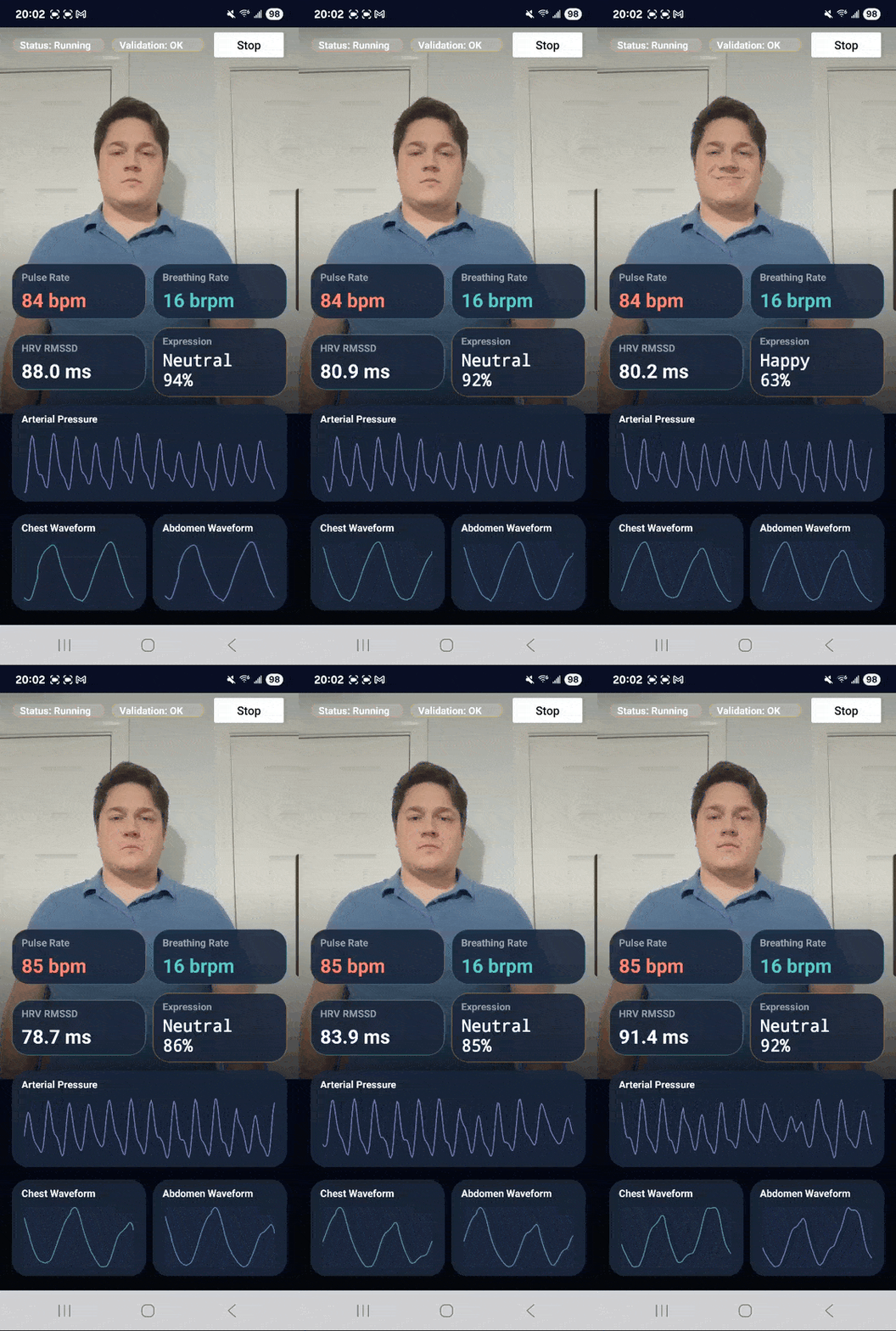
At the end, the app should show:
- live camera preview
- pulse rate, breathing rate, HRV RMSSD, and expression cards
- arterial pressure waveform
- chest and abdomen breathing waveforms
- status text and a start/stop button
- one portrait screen with no scrolling
In Android Studio, create a new Android app project:
- Select
File→New→New Project... - Choose
Empty Activity - Set
NametoCool Vitals - Set
Package nametocom.example.coolvitals - Set
LanguagetoKotlin - Set
Minimum SDKtoAPI 28or newer - Finish creating the project
If you already created the project, open it instead.
Open your Android app project in Android Studio.
In your project-level settings.gradle.kts, make sure the app can resolve AndroidX and SmartSpectra artifacts:
dependencyResolutionManagement {
    repositoriesMode.set(RepositoriesMode.FAIL_ON_PROJECT_REPOS)
    repositories {
        google()
        mavenCentral()
        // Required only for versions ending in -SNAPSHOT.
        maven {
            url = uri("https://central.sonatype.com/repository/maven-snapshots/")
            mavenContent {
                snapshotsOnly()
            }
        }
    }
}In app/build.gradle.kts, keep the dependencies generated by the Empty Activity template and add only these lines to the existing dependencies block:
dependencies {
    implementation("androidx.activity:activity-ktx:1.8.1")
    implementation("androidx.core:core-ktx:1.18.0")
    implementation("androidx.lifecycle:lifecycle-runtime-ktx:2.10.0")
    implementation("androidx.camera:camera-view:1.6.0")

    implementation("com.presagetech:smartspectra:+")
}
The + version selects the current release. To pin an exact version, use the
value in android/samples/version.properties.
androidx.activity:activity-ktx supplies ComponentActivity and
registerForActivityResult, both used by the complete activity below.
Manual check:
- Gradle sync succeeds
- AndroidX imports resolve:
PreviewView,ContextCompat, andlifecycleScope - SmartSpectra imports resolve:
SmartSpectraSdkandMetricType
Add these permissions directly inside the root <manifest> element in
app/src/main/AndroidManifest.xml, before <application>:
<uses-permission android:name="android.permission.CAMERA" />
<uses-permission android:name="android.permission.INTERNET" />This file is not created by Android Studio and is not included automatically when you add the SmartSpectra dependency.
You need to get it from Presage first:
- Sign in to the Presage developer portal:
https://physiology.presagetech.com/auth/login - Open Account → OAuth Registration
- Select
Android - Enter your Android App ID. For this quickstart, use
com.example.coolvitals. - Enter the SHA-256 fingerprint for the signing certificate used by the app you will release.
- Click Register App ID
- Download the Android OAuth config file named
presage_services.xml
If you are testing a sandbox-enabled app registration, make sure the app row shows Sandbox Status: Enabled. Click Enable if sandbox is not already enabled.
An AI assistant connected to the SmartSpectra MCP Server can do this step for you: it registers the app ID and fingerprint (apps.register) and fetches presage_services.xml (apps.get_config) without you opening the portal. Registration asks you to confirm before it takes effect.
See Google's Authenticating Your Client guide for Android signing certificate fingerprints.
To get the SHA-256 fingerprint from Gradle, run:
./gradlew signingReport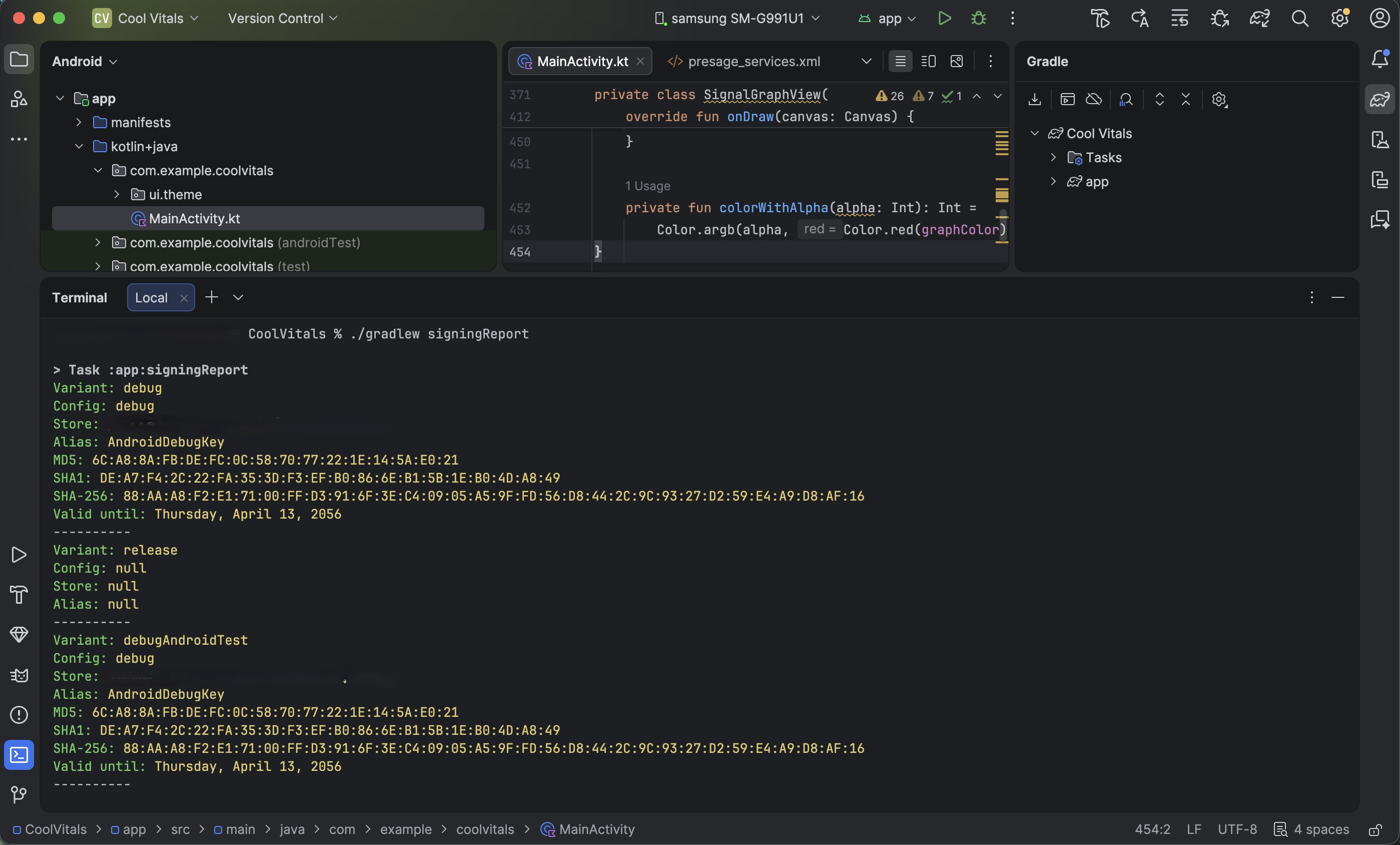
If you cannot find a download for presage_services.xml, stop here. Ask Presage support or your Presage contact for the Android OAuth XML for this app.
In Android Studio:
- Create
app/src/main/res/xml/if it does not already exist - Put
presage_services.xmlin that directory - Confirm the file is packaged with the app target
The file should contain the OAuth fields provided by Presage, for example:
<?xml version="1.0" encoding="utf-8"?>
<resources xmlns:android="http://schemas.android.com/apk/res/android">
    <string name="oauth_enabled">true</string>
    <string name="client_id">your_client_id</string>
    <string name="sub">your_sub</string>
    <string name="config_version">1.0</string>
</resources>In Android Studio:
- Open
app/src/main/java/com/example/coolvitals/MainActivity.kt - Delete everything in the file
- Paste the full file below
Paste this entire file:
package com.example.coolvitals

import android.Manifest
import android.content.Context
import android.content.pm.PackageManager
import android.content.res.ColorStateList
import android.graphics.Canvas
import android.graphics.Color
import android.graphics.Paint
import android.graphics.Path
import android.graphics.drawable.GradientDrawable
import android.os.Bundle
import android.view.Gravity
import android.view.View
import android.view.ViewGroup
import android.widget.Button
import android.widget.FrameLayout
import android.widget.LinearLayout
import android.widget.TextView
import androidx.activity.ComponentActivity
import androidx.activity.result.contract.ActivityResultContracts
import androidx.camera.view.PreviewView
import androidx.core.content.ContextCompat
import androidx.core.view.ViewCompat
import androidx.core.view.WindowCompat
import androidx.core.view.WindowInsetsCompat
import androidx.lifecycle.lifecycleScope
import com.presagetech.smartspectra.CameraPosition
import com.presagetech.smartspectra.ProcessingStatus
import com.presagetech.smartspectra.SmartSpectraConfig
import com.presagetech.smartspectra.SmartSpectraSdk
import com.presagetech.smartspectra.proto.MetricTypesProto.MetricType
import com.presagetech.smartspectra.proto.MetricsProto.ExpressionType
import kotlin.math.max
import kotlin.math.min
import kotlin.math.roundToInt
import kotlinx.coroutines.launch

class MainActivity : ComponentActivity() {
    private companion object {
        val TEXT_PRIMARY = Color.WHITE
        val TEXT_MUTED = 0x80FFFFFF.toInt()
        val CARD_OVERLAY = 0xE61A2233.toInt()
        val CORAL = 0xFFFF6B6B.toInt()
        val TEAL = 0xFF4FCCC4.toInt()
        val VIOLET = 0xFFA58CF9.toInt()
        val MINT = 0xFF6EE7B7.toInt()
        val BLUE = 0xFF60A5FA.toInt()
        val AMBER = 0xFFFBBF24.toInt()
    }

    private val sdk by lazy { SmartSpectraSdk.shared }

    private lateinit var heartRateLabel: TextView
    private lateinit var expressionLabel: TextView
    private lateinit var breathingRateLabel: TextView
    private lateinit var hrvLabel: TextView
    private lateinit var chestGraphView: SignalGraphView
    private lateinit var abdomenGraphView: SignalGraphView
    private lateinit var arterialPressureGraphView: SignalGraphView
    private lateinit var statusLabel: TextView
    private lateinit var validationLabel: TextView
    private lateinit var toggleButton: Button

    private var latestChestTimestamp: Long = Long.MIN_VALUE
    private var latestAbdomenTimestamp: Long = Long.MIN_VALUE
    private var latestPressureTimestamp: Long = Long.MIN_VALUE

    private val cameraPermissionLauncher = registerForActivityResult(
        ActivityResultContracts.RequestPermission(),
    ) { granted ->
        if (granted) {
            startProcessing()
        } else {
            statusLabel.text = "Status: Camera required"
        }
    }

    override fun onCreate(savedInstanceState: Bundle?) {
        super.onCreate(savedInstanceState)
        WindowCompat.setDecorFitsSystemWindows(window, false)

        sdk.config.imageOutputEnabled = false
        sdk.config.cameraPosition = CameraPosition.FRONT
        sdk.config.requestedMetrics =
            SmartSpectraConfig.breathingMetrics +
                    SmartSpectraConfig.cardioMetrics +
                    listOf(MetricType.EXPRESSIONS)

        buildUi()
        bindSdk()
        resetMeasurementUi()
        statusLabel.text = "Status: Idle"
    }

    override fun onPause() {
        super.onPause()
        lifecycleScope.launch {
            when (sdk.processingStatus.value) {
                ProcessingStatus.RUNNING,
                ProcessingStatus.STARTING,
                ProcessingStatus.STOPPING,
                    -> runCatching { sdk.stop() }
                else -> Unit
            }
        }
    }

    private fun bindSdk() {
        sdk.processingStatus.observe(this) { updateProcessingStatus(it) }
        sdk.validationStatus.observe(this) { status ->
            validationLabel.text = "Validation: ${status?.code?.name?.replace('_', ' ') ?: "--"}"
        }
        sdk.error.observe(this) { error ->
            if (error != null) {
                statusLabel.text = "Error: ${error.message ?: "Unknown"}"
            }
        }
        sdk.metrics.observe(this) { metrics ->
            if (metrics == null) return@observe

            if (metrics.hasCardio()) {
                val pulse = metrics.cardio.pulseRateList
                    .lastOrNull { it.timestamp > 0 }
                    ?.value
                    ?.roundToInt()
                if (pulse != null) {
                    heartRateLabel.text = "$pulse bpm"
                }

                metrics.cardio.arterialPressureTraceList.forEach { sample ->
                    if (sample.timestamp > latestPressureTimestamp) {
                        latestPressureTimestamp = sample.timestamp
                        arterialPressureGraphView.appendValue(sample.value)
                    }
                }

                metrics.cardio.hrvList.lastOrNull()?.rmssd?.let { rmssd ->
                    if (rmssd > 0) {
                        hrvLabel.text = "${(rmssd * 10).roundToInt() / 10.0} ms"
                    }
                }
            }

            if (metrics.hasBreathing()) {
                if (metrics.breathing.rateCount > 0) {
                    val breathingRate = metrics.breathing.rateList.last().value.roundToInt()
                    breathingRateLabel.text = "$breathingRate bpm"
                }

                metrics.breathing.upperTraceList.forEach { sample ->
                    if (sample.timestamp > latestChestTimestamp) {
                        latestChestTimestamp = sample.timestamp
                        chestGraphView.appendValue(sample.value)
                    }
                }

                metrics.breathing.lowerTraceList.forEach { sample ->
                    if (sample.timestamp > latestAbdomenTimestamp) {
                        latestAbdomenTimestamp = sample.timestamp
                        abdomenGraphView.appendValue(sample.value)
                    }
                }
            }

            if (metrics.hasFace()) {
                val expression = metrics.face.expressionList.lastOrNull() ?: return@observe
                val topScore = expression.scoresList
                    .filter { it.confidence > 0f }
                    .maxByOrNull { it.confidence } ?: return@observe
                val expressionName = topScore.type.expressionName() ?: return@observe
                expressionLabel.text = "%-8.8s %3d%%".format(expressionName, topScore.confidence.roundToInt())
            }
        }

    }

    private fun buildUi() {
        val horizontalInset = dp(14)
        val topInsetSpacing = dp(8)
        val bottomInsetSpacing = dp(12)
        val root = FrameLayout(this).apply {
            background = GradientDrawable(
                GradientDrawable.Orientation.TOP_BOTTOM,
                intArrayOf(0xFF0B1020.toInt(), 0xFF05070C.toInt()),
            )
        }

        val previewView = PreviewView(this).apply {
            contentDescription = "SmartSpectra preview output"
            setBackgroundColor(Color.BLACK)
            scaleType = PreviewView.ScaleType.FILL_CENTER
            implementationMode = PreviewView.ImplementationMode.COMPATIBLE
        }
        sdk.config.previewSurfaceProvider = previewView.surfaceProvider
        val previewParams = FrameLayout.LayoutParams(
            ViewGroup.LayoutParams.MATCH_PARENT,
            dp(465),
            Gravity.TOP,
        )
        root.addView(previewView, previewParams)
        val previewOverlay = View(this).apply {
            background = GradientDrawable(
                GradientDrawable.Orientation.TOP_BOTTOM,
                intArrayOf(0x33000000, 0x00000000, 0xCC05070C.toInt()),
            )
        }
        val previewOverlayParams = FrameLayout.LayoutParams(
            ViewGroup.LayoutParams.MATCH_PARENT,
            dp(465),
            Gravity.TOP,
        )
        root.addView(
            previewOverlay,
            previewOverlayParams,
        )

        val topPanel = LinearLayout(this).apply {
            orientation = LinearLayout.VERTICAL
            setPadding(horizontalInset, topInsetSpacing, horizontalInset, 0)
        }
        root.addView(
            topPanel,
            FrameLayout.LayoutParams(
                ViewGroup.LayoutParams.MATCH_PARENT,
                ViewGroup.LayoutParams.WRAP_CONTENT,
                Gravity.TOP,
            ),
        )

        val topRow = horizontalRow()
        statusLabel = statusPill("Status", "Idle", CORAL)
        validationLabel = statusPill("Validation", "--", AMBER)
        toggleButton = Button(this).apply {
            text = "Start"
            setAllCaps(false)
            setTextColor(Color.BLACK)
            backgroundTintList = ColorStateList.valueOf(Color.WHITE)
            setOnClickListener { toggleProcessing() }
        }
        topRow.addView(statusLabel, weightedParams(endMargin = dp(8)))
        topRow.addView(validationLabel, weightedParams(endMargin = dp(8)))
        topRow.addView(toggleButton, LinearLayout.LayoutParams(dp(92), dp(42)))
        topPanel.addView(topRow)

        val panel = LinearLayout(this).apply {
            orientation = LinearLayout.VERTICAL
            setPadding(horizontalInset, 0, horizontalInset, 0)
        }
        val panelParams = FrameLayout.LayoutParams(
            ViewGroup.LayoutParams.MATCH_PARENT,
            ViewGroup.LayoutParams.WRAP_CONTENT,
            Gravity.BOTTOM,
        )
        root.addView(
            panel,
            panelParams,
        )

        heartRateLabel = textView(sizeSp = 23f, color = CORAL, bold = true)
        breathingRateLabel = textView(sizeSp = 23f, color = TEAL, bold = true)
        val rateRow = horizontalRow()
        rateRow.addView(metricCard("Pulse Rate", heartRateLabel, CORAL), weightedParams(endMargin = dp(8)))
        rateRow.addView(metricCard("Breathing Rate", breathingRateLabel, TEAL), weightedParams())
        panel.addView(rateRow, matchWrapBottomMargin(dp(10)))

        hrvLabel = textView(sizeSp = 23f, color = TEXT_PRIMARY, bold = true)
        expressionLabel = textView(sizeSp = 20f, color = TEXT_PRIMARY, bold = true).apply {
            typeface = android.graphics.Typeface.create(android.graphics.Typeface.MONOSPACE, android.graphics.Typeface.BOLD)
            includeFontPadding = false
        }
        val summaryRow = horizontalRow()
        summaryRow.addView(metricCard("HRV RMSSD", hrvLabel, MINT), weightedParams(endMargin = dp(8)))
        summaryRow.addView(metricCard("Expression", expressionLabel, AMBER), weightedParams())
        panel.addView(summaryRow, matchWrapBottomMargin(dp(10)))

        arterialPressureGraphView = SignalGraphView(this, VIOLET)
        panel.addView(waveformCard("Arterial Pressure", arterialPressureGraphView), matchWrapBottomMargin(dp(10)))

        chestGraphView = SignalGraphView(this, TEAL)
        abdomenGraphView = SignalGraphView(this, BLUE)
        val breathingRow = horizontalRow()
        breathingRow.addView(waveformCard("Chest Waveform", chestGraphView), weightedParams(endMargin = dp(8)))
        breathingRow.addView(waveformCard("Abdomen Waveform", abdomenGraphView), weightedParams())
        panel.addView(breathingRow, matchHeight(dp(126)))

        ViewCompat.setOnApplyWindowInsetsListener(root) { _, windowInsets ->
            val systemBars = windowInsets.getInsets(WindowInsetsCompat.Type.systemBars())
            val previewTopMargin = systemBars.top + topInsetSpacing

            previewParams.topMargin = previewTopMargin
            previewView.layoutParams = previewParams

            previewOverlayParams.topMargin = previewTopMargin
            previewOverlay.layoutParams = previewOverlayParams

            topPanel.setPadding(
                horizontalInset + systemBars.left,
                previewTopMargin,
                horizontalInset + systemBars.right,
                0,
            )
            panel.setPadding(
                horizontalInset + systemBars.left,
                0,
                horizontalInset + systemBars.right,
                0,
            )
            panelParams.bottomMargin = systemBars.bottom + bottomInsetSpacing
            panel.layoutParams = panelParams

            windowInsets
        }
        setContentView(root)
        ViewCompat.requestApplyInsets(root)
    }

    private fun toggleProcessing() {
        when (sdk.processingStatus.value) {
            ProcessingStatus.RUNNING -> lifecycleScope.launch { runCatching { sdk.stop() } }
            ProcessingStatus.STARTING, ProcessingStatus.STOPPING -> Unit
            else -> startProcessing()
        }
    }

    private fun startProcessing() {
        if (ContextCompat.checkSelfPermission(this, Manifest.permission.CAMERA)
            != PackageManager.PERMISSION_GRANTED
        ) {
            cameraPermissionLauncher.launch(Manifest.permission.CAMERA)
            return
        }
        lifecycleScope.launch {
            resetMeasurementUi()
            runCatching { sdk.start() }
                .onFailure {
                    statusLabel.text = "Error: ${it.message ?: "Unknown"}"
                }
        }
    }

    private fun updateProcessingStatus(status: ProcessingStatus?) {
        when (status) {
            ProcessingStatus.IDLE -> {
                statusLabel.text = "Status: Idle"
                toggleButton.text = "Start"
                toggleButton.isEnabled = true
            }
            ProcessingStatus.STARTING -> {
                statusLabel.text = "Status: Starting"
                toggleButton.text = "Starting..."
                toggleButton.isEnabled = false
            }
            ProcessingStatus.RUNNING -> {
                statusLabel.text = "Status: Running"
                toggleButton.text = "Stop"
                toggleButton.isEnabled = true
            }
            ProcessingStatus.STOPPING -> {
                statusLabel.text = "Status: Stopping"
                toggleButton.text = "Stopping..."
                toggleButton.isEnabled = false
            }
            ProcessingStatus.ERROR -> {
                toggleButton.text = "Start"
                toggleButton.isEnabled = true
            }
            null -> Unit
        }
    }

    private fun resetMeasurementUi() {
        latestChestTimestamp = Long.MIN_VALUE
        latestAbdomenTimestamp = Long.MIN_VALUE
        latestPressureTimestamp = Long.MIN_VALUE
        chestGraphView.reset()
        abdomenGraphView.reset()
        arterialPressureGraphView.reset()
        heartRateLabel.text = "-- bpm"
        expressionLabel.text = "--"
        breathingRateLabel.text = "-- bpm"
        hrvLabel.text = "-- ms"
    }

    private fun card(buildChildren: LinearLayout.() -> Unit): LinearLayout =
        LinearLayout(this).apply {
            orientation = LinearLayout.VERTICAL
            background = GradientDrawable().apply {
                setColor(CARD_OVERLAY)
                cornerRadius = dp(20).toFloat()
            }
            setPadding(dp(12), dp(8), dp(12), dp(8))
            buildChildren()
        }

    private fun metricCard(title: String, value: TextView, accent: Int): LinearLayout =
        card {
            addView(textView(title, sizeSp = 12f, color = TEXT_MUTED, bold = true))
            addView(value, matchWrapTopMargin(dp(4)))
        }.apply {
            background = GradientDrawable().apply {
                setColor(CARD_OVERLAY)
                setStroke(dp(1), colorWithAlpha(accent, 70))
                cornerRadius = dp(20).toFloat()
            }
        }

    private fun waveformCard(title: String, graphView: SignalGraphView): LinearLayout =
        card {
            addView(textView(title, sizeSp = 12f, color = TEXT_PRIMARY, bold = true))
            addView(graphView, matchHeight(dp(78)).apply { topMargin = dp(6) })
        }

    private fun statusPill(title: String, value: String, accent: Int): TextView =
        textView("$title: $value", sizeSp = 12f, color = TEXT_PRIMARY, bold = true).apply {
            gravity = Gravity.CENTER_VERTICAL
            setPadding(dp(10), 0, dp(10), 0)
            background = GradientDrawable().apply {
                setColor(0x26FFFFFF)
                setStroke(dp(1), colorWithAlpha(accent, 90))
                cornerRadius = dp(18).toFloat()
            }
        }

    private fun horizontalRow(): LinearLayout =
        LinearLayout(this).apply {
            orientation = LinearLayout.HORIZONTAL
            gravity = Gravity.CENTER_VERTICAL
        }

    private fun textView(
        text: String = "",
        sizeSp: Float,
        color: Int,
        bold: Boolean = false,
    ): TextView = TextView(this).apply {
        this.text = text
        textSize = sizeSp
        setTextColor(color)
        if (bold) typeface = android.graphics.Typeface.DEFAULT_BOLD
    }

    private fun matchWrapBottomMargin(bottomMargin: Int): LinearLayout.LayoutParams =
        LinearLayout.LayoutParams(
            ViewGroup.LayoutParams.MATCH_PARENT,
            ViewGroup.LayoutParams.WRAP_CONTENT,
        ).apply { this.bottomMargin = bottomMargin }

    private fun matchHeight(height: Int): LinearLayout.LayoutParams =
        LinearLayout.LayoutParams(
            ViewGroup.LayoutParams.MATCH_PARENT,
            height,
        )

    private fun matchWrapTopMargin(topMargin: Int): LinearLayout.LayoutParams =
        LinearLayout.LayoutParams(
            ViewGroup.LayoutParams.MATCH_PARENT,
            ViewGroup.LayoutParams.WRAP_CONTENT,
        ).apply { this.topMargin = topMargin }

    private fun weightedParams(endMargin: Int = 0): LinearLayout.LayoutParams =
        LinearLayout.LayoutParams(0, ViewGroup.LayoutParams.WRAP_CONTENT, 1f).apply {
            marginEnd = endMargin
        }

    private fun dp(value: Int): Int = (value * resources.displayMetrics.density).roundToInt()

    private fun colorWithAlpha(color: Int, alpha: Int): Int =
        Color.argb(alpha, Color.red(color), Color.green(color), Color.blue(color))

    private fun ExpressionType.expressionName(): String? =
        when (this) {
            ExpressionType.ANGRY -> "Angry"
            ExpressionType.CONTEMPT -> "Contempt"
            ExpressionType.DISGUST -> "Disgust"
            ExpressionType.FEAR -> "Fear"
            ExpressionType.HAPPY -> "Happy"
            ExpressionType.NEUTRAL -> "Neutral"
            ExpressionType.SAD -> "Sad"
            ExpressionType.SURPRISE -> "Surprise"
            else -> null
        }
}

private class SignalGraphView(
    context: Context,
    private val graphColor: Int,
) : View(context) {
    private companion object {
        const val GRID_ALPHA = 12
        const val LINE_ALPHA = 170
    }

    private val samples = ArrayDeque<Float>()
    private val maxPoints = 200
    private val inset = 10f
    private val linePath = Path()

    private val gridPaint = Paint(Paint.ANTI_ALIAS_FLAG).apply {
        color = Color.argb(GRID_ALPHA, 255, 255, 255)
        strokeWidth = 1f
        style = Paint.Style.STROKE
    }

    private val linePaint = Paint(Paint.ANTI_ALIAS_FLAG).apply {
        color = colorWithAlpha(LINE_ALPHA)
        strokeWidth = 3.5f
        style = Paint.Style.STROKE
        strokeCap = Paint.Cap.ROUND
        strokeJoin = Paint.Join.ROUND
    }

    fun appendValue(value: Float) {
        samples.addLast(value)
        while (samples.size > maxPoints) {
            samples.removeFirst()
        }
        invalidate()
    }

    fun reset() {
        samples.clear()
        invalidate()
    }

    override fun onDraw(canvas: Canvas) {
        super.onDraw(canvas)
        val sampleCount = samples.size
        if (sampleCount < 2) return

        val drawLeft = inset
        val drawTop = inset
        val drawRight = width - inset
        val drawBottom = height - inset
        val drawWidth = drawRight - drawLeft
        val drawHeight = drawBottom - drawTop

        for (gridLine in 1..3) {
            val y = drawTop + drawHeight * (1f - gridLine / 4f)
            canvas.drawLine(drawLeft, y, drawRight, y, gridPaint)
        }

        var minValue = Float.POSITIVE_INFINITY
        var maxValue = Float.NEGATIVE_INFINITY
        samples.forEach {
            minValue = min(minValue, it)
            maxValue = max(maxValue, it)
        }
        val range = if (maxValue - minValue == 0f) 1f else maxValue - minValue

        linePath.reset()
        samples.forEachIndexed { index, value ->
            val x = drawLeft + drawWidth * index / (sampleCount - 1)
            val normalized = (value - minValue) / range
            val y = drawBottom - normalized * drawHeight
            if (index == 0) {
                linePath.moveTo(x, y)
            } else {
                linePath.lineTo(x, y)
            }
        }

        canvas.drawPath(linePath, linePaint)
    }

    private fun colorWithAlpha(alpha: Int): Int =
        Color.argb(alpha, Color.red(graphColor), Color.green(graphColor), Color.blue(graphColor))
}
In Android Studio:
- Choose a physical Android device as the run destination
- Build and run the app
- Allow camera access when Android asks
- Tap
Start - Wait a few seconds for camera tuning and signal stabilization
When your program is running, you should see all of these:
StatusandValidationchips are visible at the top- the
Startbutton changes toStopafter processing starts - the camera preview is below the chips
- pulse rate, breathing rate, HRV, and expression cards are visible
- the arterial pressure waveform is larger than the breathing waveforms
- chest and abdomen waveforms both appear on screen
- the screen fits in portrait orientation without scrolling
Cards appear immediately but fill in on their own schedules:
| Card | First value | Confident value |
|---|---|---|
| Pulse rate | ~12 s | ~12 s (12-second average) |
| Breathing rate | ~10 s | ~30 s (confidence is 0 before) |
| HRV | ~30 s | ~60 s (confidence is 0 before) |
See Model cards and limitations.
If OAuth is wired correctly, the app should start without setting sdk.config.apiKey. If startup fails with an authentication error, verify that presage_services.xml is present in app/src/main/res/xml/ and that the OAuth app registration matches the installed app.
If the screen does not match the target state, check these first:
- the dependency was added to the wrong Gradle module
- Gradle sync did not complete after adding the SmartSpectra dependency
MainActivity.ktwas only partially replacedpresage_services.xmlis not inapp/src/main/res/xml/- the OAuth app registration uses a different package name or signing certificate
- the app is still running an older installed build on the phone