 SmartSpectra SDK
Swift
Option 1: API Key
Fast manual SmartSpectra Swift setup using an API key.
QuickStart - API Key
Use this if you want the fastest manual path.
What you will change manually
You will touch exactly these things:
- The app target package dependencies
- The app target camera permission
Cool Vitals/ContentView.swift
You do not need to create any new Swift files.
Result you should get
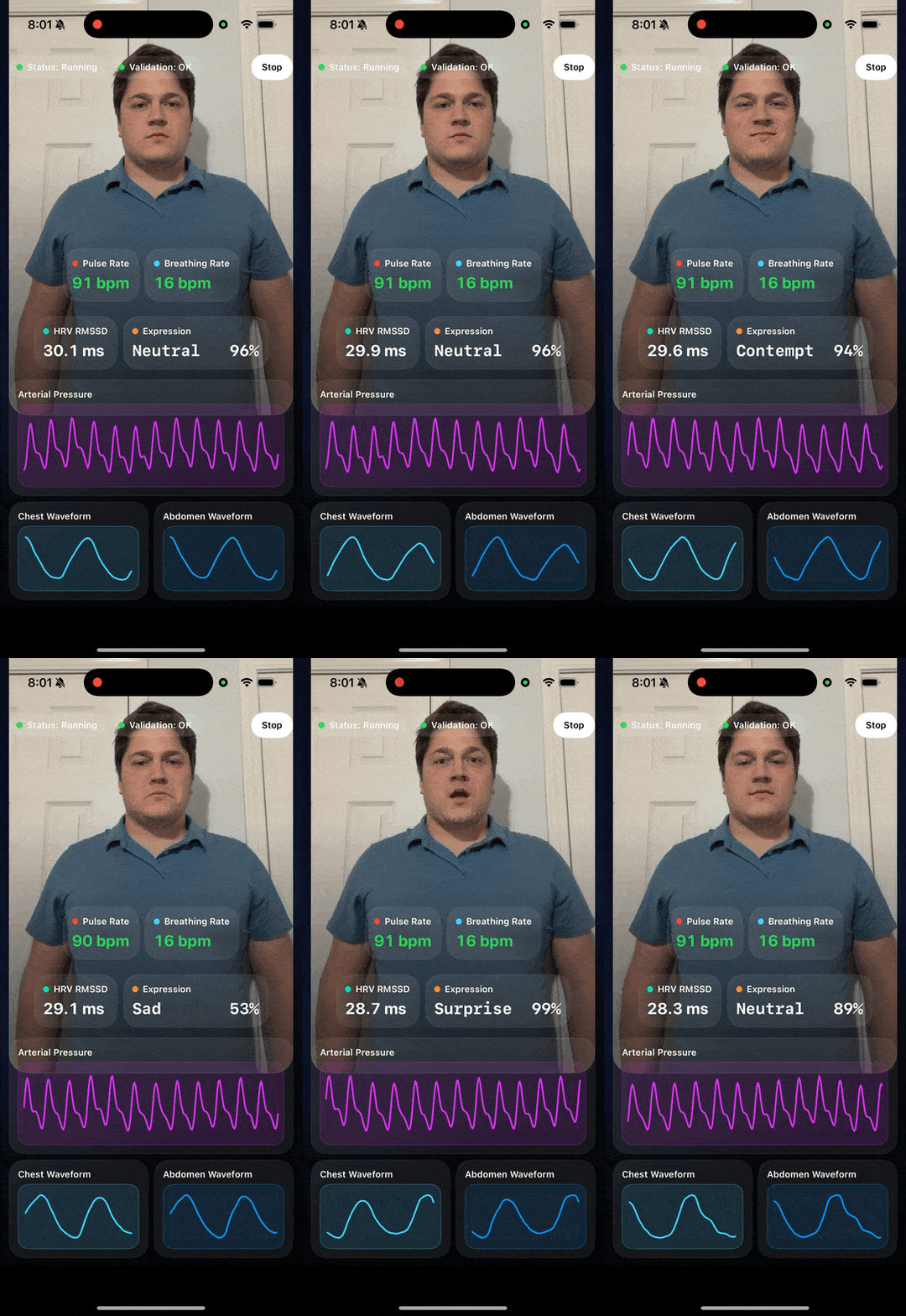
At the end, the app should show:
StatusandValidationat the top- live camera preview
- pulse rate, breathing rate, HRV RMSSD, and expression cards
- white labels for those four cards
- confidence-colored pulse and breath-rate values
- one large arterial pressure waveform
- chest and abdomen breathing waveforms
- guidance text below the breathing waveforms
- one portrait screen with no scrolling
Register for your free API Key
Create an Account
- Navigate to the Presage Developer Admin Portal Registration
- Click Register and fill in your email, password, and other required fields.
- Check your email for a confirmation link and follow it to activate your account.
Log In
- Go to the Presage Developer Admin Portal Login
- Enter your email and password, then click Submit.
- After successful login you will be redirected to your Portal page, where you can manage your API key.
Step 1 — Create the project
In Xcode, create a new iOS app project:
- Select
File→New→Project... - Choose
iOS→App - Set
Product NametoCool Vitals - Set
InterfacetoSwiftUI - Set
LanguagetoSwift - Save the project
If you already created the project, open it instead.
In Finder, open:
Cool Vitals/Cool Vitals.xcodeproj
Then select the app target in Xcode.
Step 2 — Add the SmartSpectra package
In Xcode:
- Click
File→Add Package Dependencies... - Paste
https://github.com/Presage-Security/SmartSpectra-Swift/ - For repeatable builds, choose
Exact Versionand enter a released tag such as3.0.0 - Use
Branch→mainonly when testing the latest final public release before pinning a version - Add the package to the
Cool Vitalsapp target
Manual check:
- In the project navigator, you should now see
Package Dependencies SmartSpectrashould be attached to the app target
Step 3 — Add camera permission
In Xcode:
- Select the
Cool Vitalstarget - Open the
Infotab - Add a new key named
Privacy - Camera Usage Description
NOTECtrl + Clickon theCustom iOS Target Propertiesand clickAdd Row - Set the value to
This app needs camera access to measure vitals.
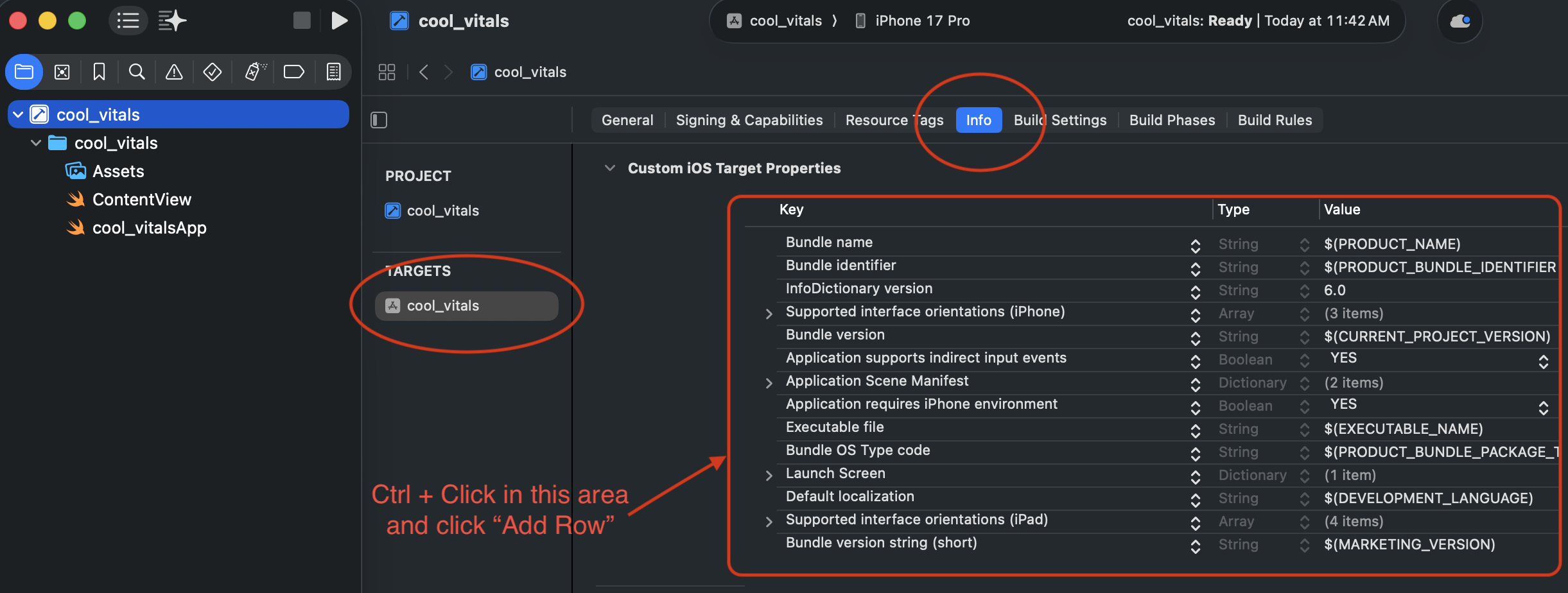
Manual check:
- The app target now has a camera usage description
Step 4 — Replace ContentView.swift
In Xcode:
- Open
Cool Vitals/ContentView.swift - Delete everything in the file
- Paste the full file below
- Replace
YOUR_API_KEYwith your real API key
NOTE: Log in or register at the Presage developer portal for your API key.
Paste this entire file:
import SwiftUI
import SmartSpectra
import AVFoundation
struct ContentView: View {
private enum TraceWindow {
static let rate = 120
static let arterialWaveform = 240
static let breathingWaveform = 180
}
private let sdk = SmartSpectraSDK.shared
@State private var didAutoStart = false
@State private var pulseRateBuffer: [MeasurementWithConfidence] = []
@State private var breathingRateBuffer: [MeasurementWithConfidence] = []
@State private var arterialPressureBuffer: [MeasurementWithConfidence] = []
@State private var chestBuffer: [SmartSpectra.Measurement] = []
@State private var abdomenBuffer: [SmartSpectra.Measurement] = []
@State private var latestHrv: Hrv?
@State private var latestExpressionScores: [ExpressionScore] = []
init() {
sdk.config.apiKey = "YOUR_API_KEY"
sdk.config.cameraPosition = .front
sdk.config.imageOutputEnabled = true
sdk.config.requestedMetrics =
SmartSpectraConfig.breathingMetrics +
SmartSpectraConfig.cardioMetrics + [
.expressions,
]
}
private enum WaveformProminence {
case primary
case secondary
}
private var metrics: Metrics? { sdk.metrics }
private var metricsUpdateToken: Int64 {
[
metrics?.cardio.pulseRate.last?.timestamp,
metrics?.breathing.rate.last?.timestamp,
metrics?.cardio.arterialPressureTrace.last?.timestamp,
metrics?.breathing.upperTrace.last?.timestamp,
metrics?.breathing.lowerTrace.last?.timestamp,
metrics?.cardio.hrv.last?.timestamp,
metrics?.face.expression.last?.timestamp,
]
.compactMap { $0 }
.max() ?? 0
}
private var pulseRateText: String {
formatMetric(pulseRateBuffer.last.map { Double($0.value) }, digits: 0, suffix: " bpm")
}
private var breathingRateText: String {
formatMetric(breathingRateBuffer.last.map { Double($0.value) }, digits: 0, suffix: " bpm")
}
private var hrvText: String {
guard let value = latestHrv?.rmssd, value > 0 else { return "--" }
return formatMetric(value, digits: 1, suffix: " ms")
}
private var latestExpressionScore: ExpressionScore? {
latestExpressionScores.max(by: { $0.confidence < $1.confidence })
}
private var latestExpressionLabel: String {
guard let score = latestExpressionScore else { return "--" }
let name = String(expressionName(score.type).prefix(8))
let paddedName = name + String(repeating: " ", count: max(0, 8 - name.count))
let percent = confidenceText(score.confidence)
let paddedPercent = String(repeating: " ", count: max(0, 4 - percent.count)) + percent
return "\(paddedName) \(paddedPercent)"
}
private var pulseConfidenceColor: Color {
confidenceColor(pulseRateBuffer.last?.confidence)
}
private var breathingConfidenceColor: Color {
confidenceColor(breathingRateBuffer.last?.confidence)
}
private var arterialPressureSamples: [Double] {
arterialPressureBuffer.map { Double($0.value) }
}
private var chestSamples: [Double] {
chestBuffer.map { Double($0.value) }
}
private var abdomenSamples: [Double] {
abdomenBuffer.map { Double($0.value) }
}
private var statusText: String {
switch sdk.processingStatus {
case .idle: return "Idle"
case .starting: return "Starting"
case .running: return "Running"
case .stopping: return "Stopping"
case .error: return "Error"
@unknown default: return "Unknown"
}
}
private var validationTitle: String {
guard let validationStatus = sdk.validationStatus else { return "Waiting" }
return validationName(validationStatus.code)
}
private var statusColor: Color {
switch sdk.processingStatus {
case .running: return .green
case .starting, .stopping: return .orange
case .error: return .red
case .idle: return .gray
@unknown default: return .gray
}
}
private var validationColor: Color {
guard let validationStatus = sdk.validationStatus else { return .gray }
switch validationStatus.code {
case .ok: return .green
case .cameraTuning: return .orange
default: return .yellow
}
}
var body: some View {
GeometryReader { geometry in
let compact = geometry.size.height < 820
let horizontalPadding: CGFloat = compact ? 12 : 16
let topSpacing: CGFloat = compact ? 8 : 12
let previewHeight = min(max(geometry.size.height * 0.26, 190), 250)
VStack(spacing: topSpacing) {
statusBar(compact: compact)
.zIndex(1)
previewCard
.frame(height: previewHeight)
.zIndex(0)
HStack(spacing: topSpacing) {
metricCard(
title: "Pulse Rate",
value: pulseRateText,
valueColor: pulseConfidenceColor,
accent: .red,
compact: compact
)
metricCard(
title: "Breathing Rate",
value: breathingRateText,
valueColor: breathingConfidenceColor,
accent: .cyan,
compact: compact
)
}
.frame(maxHeight: compact ? 82 : 92)
HStack(spacing: topSpacing) {
metricCard(
title: "HRV RMSSD",
value: hrvText,
valueColor: .white,
accent: .mint,
compact: compact
)
metricCard(
title: "Expression",
value: latestExpressionLabel,
valueColor: .white,
accent: .orange,
compact: compact,
monospacedValue: true
)
}
.frame(maxHeight: compact ? 82 : 92)
waveformCard(
title: "Arterial Pressure",
samples: arterialPressureSamples,
accent: .purple,
compact: compact,
prominence: .primary
)
.frame(height: compact ? 154 : 182)
HStack(spacing: topSpacing) {
waveformCard(
title: "Chest Waveform",
samples: chestSamples,
accent: .cyan,
compact: compact,
prominence: .secondary
)
waveformCard(
title: "Abdomen Waveform",
samples: abdomenSamples,
accent: .blue,
compact: compact,
prominence: .secondary
)
}
.frame(height: compact ? 130 : 146)
}
.padding(.horizontal, horizontalPadding)
.padding(.vertical, compact ? 10 : 14)
.background(backgroundGradient.ignoresSafeArea())
}
.task {
await startIfNeeded()
}
.task(id: metricsUpdateToken) {
mergeCurrentMetrics()
}
}
private var previewCard: some View {
ZStack {
if let image = sdk.imageOutput {
Image(uiImage: image)
.resizable()
.aspectRatio(contentMode: .fill)
.frame(maxWidth: .infinity, maxHeight: .infinity)
.clipped()
} else {
LinearGradient(
colors: [Color(red: 0.16, green: 0.24, blue: 0.46), Color.black],
startPoint: .topLeading,
endPoint: .bottomTrailing
)
VStack(spacing: 10) {
Image(systemName: "camera.viewfinder")
.font(.system(size: 40, weight: .semibold))
Text("Camera preview will appear here")
.font(.headline)
}
.foregroundStyle(.white.opacity(0.92))
}
LinearGradient(
colors: [.black.opacity(0.68), .black.opacity(0.12), .clear],
startPoint: .bottom,
endPoint: .top
)
}
.frame(maxWidth: .infinity, maxHeight: .infinity)
.clipShape(RoundedRectangle(cornerRadius: 26, style: .continuous))
.overlay(
RoundedRectangle(cornerRadius: 26, style: .continuous)
.stroke(.white.opacity(0.12), lineWidth: 1)
)
.shadow(color: .black.opacity(0.35), radius: 18, x: 0, y: 10)
}
private func statusBar(compact: Bool) -> some View {
HStack(spacing: compact ? 8 : 10) {
badge(title: "Status", value: statusText, color: statusColor)
badge(title: "Validation", value: validationTitle, color: validationColor)
Spacer(minLength: 8)
Button(action: toggleMeasurement) {
Text(sdk.processingStatus == .running ? "Stop" : "Start")
.font(.caption.bold())
.padding(.horizontal, compact ? 14 : 18)
.padding(.vertical, 10)
.background(.white, in: Capsule())
.foregroundStyle(.black)
}
}
}
private func metricCard(
title: String,
value: String,
valueColor: Color,
accent: Color,
compact: Bool,
monospacedValue: Bool = false
) -> some View {
VStack(alignment: .leading, spacing: compact ? 6 : 8) {
HStack(spacing: 6) {
Circle()
.fill(accent)
.frame(width: 8, height: 8)
Text(title)
.font(.caption.weight(.semibold))
.foregroundStyle(.white)
}
Text(value)
.font(.system(size: compact ? 21 : 24, weight: .bold, design: monospacedValue ? .monospaced : .rounded))
.foregroundStyle(valueColor)
.monospacedDigit()
.lineLimit(1)
.minimumScaleFactor(0.7)
}
.dashboardCard()
}
private func waveformCard(
title: String,
samples: [Double],
accent: Color,
compact: Bool,
prominence: WaveformProminence
) -> some View {
VStack(alignment: .leading, spacing: compact ? 6 : 8) {
VStack(alignment: .leading, spacing: 2) {
Text(title)
.font(.caption.weight(.semibold))
.foregroundStyle(.white)
}
ZStack {
RoundedRectangle(cornerRadius: 14, style: .continuous)
.fill(accent.opacity(0.12))
if samples.count > 1 {
WaveformView(
samples: samples,
strokeColor: accent,
verticalPaddingFraction: prominence == .primary ? 0.14 : 0.08
)
.padding(prominence == .primary ? 8 : 10)
}
}
.frame(maxHeight: .infinity)
.overlay(
RoundedRectangle(cornerRadius: 14, style: .continuous)
.stroke(accent.opacity(0.3), lineWidth: 1)
)
}
.dashboardCard()
}
private func badge(title: String, value: String, color: Color) -> some View {
HStack(spacing: 6) {
Circle()
.fill(color)
.frame(width: 8, height: 8)
Text("\(title): \(value)")
.font(.caption.weight(.semibold))
}
.padding(.horizontal, 10)
.padding(.vertical, 8)
.background(.white.opacity(0.12), in: Capsule())
.foregroundStyle(.white)
}
private func mergeCurrentMetrics() {
guard let metrics else { return }
if !metrics.cardio.pulseRate.isEmpty {
pulseRateBuffer.appendProtoArray(contentsOf: metrics.cardio.pulseRate)
pulseRateBuffer = Array(pulseRateBuffer.suffix(TraceWindow.rate))
}
if !metrics.breathing.rate.isEmpty {
breathingRateBuffer.appendProtoArray(contentsOf: metrics.breathing.rate)
breathingRateBuffer = Array(breathingRateBuffer.suffix(TraceWindow.rate))
}
if !metrics.cardio.arterialPressureTrace.isEmpty {
arterialPressureBuffer.appendProtoArray(contentsOf: metrics.cardio.arterialPressureTrace)
arterialPressureBuffer = Array(arterialPressureBuffer.suffix(TraceWindow.arterialWaveform))
}
if !metrics.breathing.upperTrace.isEmpty {
chestBuffer.appendProtoArray(contentsOf: metrics.breathing.upperTrace)
chestBuffer = Array(chestBuffer.suffix(TraceWindow.breathingWaveform))
}
if !metrics.breathing.lowerTrace.isEmpty {
abdomenBuffer.appendProtoArray(contentsOf: metrics.breathing.lowerTrace)
abdomenBuffer = Array(abdomenBuffer.suffix(TraceWindow.breathingWaveform))
}
if let hrv = metrics.cardio.hrv.last {
latestHrv = hrv
}
if let scores = metrics.face.expression.last?.scores, !scores.isEmpty {
latestExpressionScores = scores
}
}
private func resetBuffers() {
pulseRateBuffer.removeAll(keepingCapacity: true)
breathingRateBuffer.removeAll(keepingCapacity: true)
arterialPressureBuffer.removeAll(keepingCapacity: true)
chestBuffer.removeAll(keepingCapacity: true)
abdomenBuffer.removeAll(keepingCapacity: true)
latestHrv = nil
latestExpressionScores.removeAll(keepingCapacity: true)
}
private func toggleMeasurement() {
Task {
if sdk.processingStatus == .running || sdk.processingStatus == .starting {
try? await sdk.stop()
} else {
resetBuffers()
try? await sdk.start()
}
}
}
private func startIfNeeded() async {
guard !didAutoStart else { return }
didAutoStart = true
guard sdk.processingStatus == .idle else { return }
resetBuffers()
try? await sdk.start()
}
private func confidenceText(_ confidence: Float?) -> String {
guard let confidence, confidence.isFinite else { return "--" }
let percent = min(max(Double(confidence), 0), 100)
return "\(Int(percent.rounded()))%"
}
private func confidenceColor(_ confidence: Float?) -> Color {
guard let confidence, confidence.isFinite else { return .white.opacity(0.65) }
let percent = min(max(Double(confidence), 0), 100)
switch percent {
case 85...:
return .green
case 60..<85:
return .yellow
default:
return .red
}
}
private func formatMetric(_ value: Double?, digits: Int = 0, suffix: String = "") -> String {
guard let value else { return "--" }
if digits == 0 {
return "\(Int(value.rounded()))\(suffix)"
}
return String(format: "% .\(digits)f", value).replacingOccurrences(of: " ", with: "") + suffix
}
private func validationName(_ code: ValidationCode) -> String {
switch code {
case .ok: return "OK"
case .noFaceFound: return "No Face"
case .multipleFacesFound: return "Multi Face"
case .faceNotCentered: return "Off Center"
case .faceSizeOutOfRange: return "Face Size"
case .tooDark: return "Too Dark"
case .tooBright: return "Too Bright"
case .chestNotVisible: return "Chest Missing"
case .cameraTuning: return "Tuning"
@unknown default: return "Unknown"
}
}
private func expressionName(_ type: ExpressionType) -> String {
switch type {
case .unspecified: return "Unspecified"
case .angry: return "Angry"
case .contempt: return "Contempt"
case .disgust: return "Disgust"
case .fear: return "Fear"
case .happy: return "Happy"
case .neutral: return "Neutral"
case .sad: return "Sad"
case .surprise: return "Surprise"
case .UNRECOGNIZED(_): return "Unknown"
@unknown default: return "Unknown"
}
}
private var backgroundGradient: LinearGradient {
LinearGradient(
colors: [
Color(red: 0.03, green: 0.05, blue: 0.12),
Color(red: 0.07, green: 0.09, blue: 0.18),
Color.black,
],
startPoint: .topLeading,
endPoint: .bottomTrailing
)
}
}
private struct WaveformView: View {
let samples: [Double]
let strokeColor: Color
let verticalPaddingFraction: Double
var body: some View {
GeometryReader { geometry in
Path { path in
guard samples.count > 1 else { return }
let minValue = samples.min() ?? 0
let maxValue = samples.max() ?? 1
let rawRange = max(maxValue - minValue, 0.0001)
let padding = rawRange * verticalPaddingFraction
let lowerBound = minValue - padding
let upperBound = maxValue + padding
let range = max(upperBound - lowerBound, 0.0001)
for (index, sample) in samples.enumerated() {
let x = geometry.size.width * CGFloat(index) / CGFloat(samples.count - 1)
let normalized = (sample - lowerBound) / range
let y = geometry.size.height * (1 - normalized)
if index == 0 {
path.move(to: CGPoint(x: x, y: y))
} else {
path.addLine(to: CGPoint(x: x, y: y))
}
}
}
.stroke(strokeColor, style: StrokeStyle(lineWidth: 2.2, lineCap: .round, lineJoin: .round))
}
}
}
private extension View {
func dashboardCard() -> some View {
self
.padding(12)
.background(
RoundedRectangle(cornerRadius: 20, style: .continuous)
.fill(Color.white.opacity(0.08))
)
.overlay(
RoundedRectangle(cornerRadius: 20, style: .continuous)
.stroke(Color.white.opacity(0.08), lineWidth: 1)
)
}
}Step 5 — Build and run on a phone
In Xcode:
- Choose a physical iPhone as the run destination
- Build and run the app
- Allow camera access when iOS asks
- Wait a few seconds for camera tuning and signal stabilization
Do not use the simulator.
What success looks like
When your program is running, you should see all of these:
StatusandValidationchips are visible at the top- the preview is below the chips
- the arterial pressure waveform is larger than the breathing waveforms
- chest and abdomen waveforms both appear on screen
- the guidance text is below those waveforms
- the pulse and breath-rate numbers change color with confidence
- expressions and HRV are reported
Expected log note for API key mode
This log is expected in API key mode and is not a failure:
PresageService-Info.plist not found. OAuth authentication will be disabled. Using API key authentication instead.
Common manual mistakes
If the screen does not match the target state, check these first:
- the package was added to the wrong target
ContentView.swiftwas only partially replacedYOUR_API_KEYwas not replaced with a real key- the app is still running an older installed build on the phone
- the app was run in the simulator instead of on a real device