 SmartSpectra SDK
C++ on Windows
Install the SmartSpectra C++ SDK on Windows with NuGet or CMake, then build and run the sample app in Visual Studio.
Warning — Experimental platform: Windows support for the SmartSpectra C++ SDK is experimental. If you have any issues running SmartSpectra, contact Presage support for assistance.
| Platform | Status | Notes |
|---|---|---|
| Windows 10 / 11 (x64) | Experimental | ZIP distribution available |
For platforms not listed above, contact support@presagetech.com if you have a specific need.
Install Visual Studio Build Tools 2022 or later — or a full Visual Studio 2022 or newer install (Community edition works) — with the Desktop development with C++ workload.
During installation, select the Desktop development with C++ workload and make sure C++ CMake tools for Windows is selected. The workload installs the MSVC compiler, Windows SDK, CMake, and the developer command prompt needed for the quickstart below.
You also need an API key from physiology.presagetech.com.
Download smartspectra-sdk-<version>-windows-x64.zip from
GitHub Releases
and extract it to a permanent location, for example C:\SmartSpectra.
Keep the extracted layout intact — CMake config files, runtime DLLs, and bundled resources must stay in the locations expected by the package.
No SDK-specific OS permission setup is required on Windows.
This walkthrough sets up a minimal CMake project that reads from a camera and prints vitals to the console.
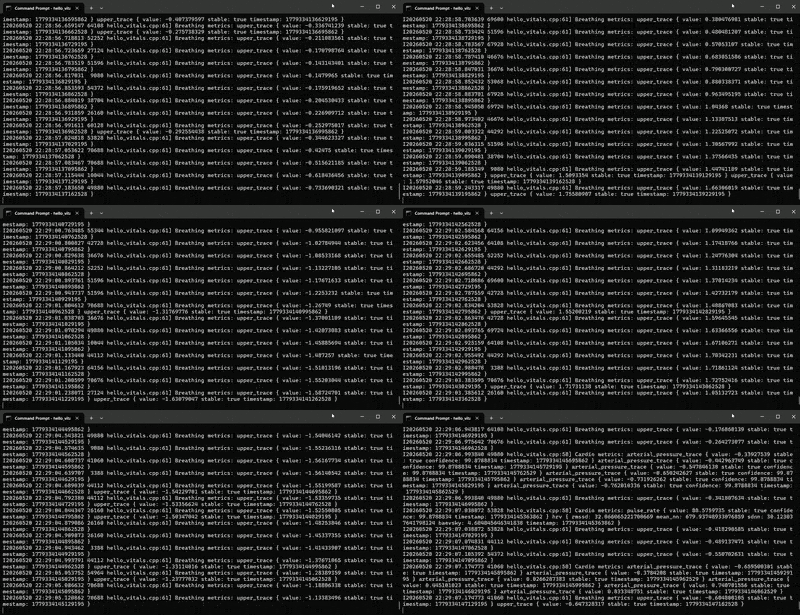
At the end, the app should show console output with:
- a successful CMake configure and build
Processing... Press Ctrl+C to stop.Cardio metrics:log lines when cardio metrics are availableBreathing metrics:log lines when breathing metrics are available- a clean exit after you stop the sample
Open the Windows Start menu and search for x64 Developer Command Prompt (a full Visual
Studio install names it x64 Native Tools Command Prompt for VS <year>).
Choose the x64 developer command prompt installed by Visual Studio (Build Tools or a full install).
For a default Build Tools installation, that shortcut launches:
C:\Windows\System32\cmd.exe /k ""C:\Program Files (x86)\Microsoft Visual Studio\2022\BuildTools\Common7\Tools\VsDevCmd.bat" -arch=x64 -host_arch=x64"If you installed Build Tools somewhere else — or use a full Visual Studio install — update the
VsDevCmd.bat path to match. For example, Visual Studio 2026 Community installs it at
C:\Program Files\Microsoft Visual Studio\18\Community\Common7\Tools\VsDevCmd.bat.
Create a folder, for example C:\Projects\HelloVitals, and add these two
files inside it.
CMakeLists.txt:
cmake_minimum_required(VERSION 3.22.1)
project(HelloVitals CXX)
set(CMAKE_CXX_STANDARD 17)
set(CMAKE_CXX_STANDARD_REQUIRED ON)

set(SMARTSPECTRA_SDK_DIR "$ENV{SMARTSPECTRA_SDK_PATH}")
if (SMARTSPECTRA_SDK_DIR STREQUAL "")
    message(FATAL_ERROR "SMARTSPECTRA_SDK_PATH is not set.")
endif ()

list(APPEND CMAKE_PREFIX_PATH "${SMARTSPECTRA_SDK_DIR}")
find_package(SmartSpectra CONFIG REQUIRED)

add_executable(hello_vitals hello_vitals.cpp)
target_link_libraries(hello_vitals SmartSpectra::SDK)hello_vitals.cpp:
This example also lives in smartspectra/cpp/samples/hello_vitals/.
#include <smartspectra/messages/metrics.h>
#include <smartspectra/smartspectra.h>
#include <smartspectra/smartspectra_config.h>

#include <chrono>
#include <csignal>
#include <cstdlib>
#include <iostream>
#include <string>
#include <thread>

namespace spectra = presage::smartspectra;

namespace {

volatile std::sig_atomic_t g_stop_requested = 0;

void HandleSignal(int) {
    g_stop_requested = 1;
}

std::string ResolveApiKey(int argc, char** argv) {
    if (argc > 1) {
        return argv[1];
    }
    if (const char* key = std::getenv("SMARTSPECTRA_API_KEY")) {
        return key;
    }
    return {};
}

}  // namespace

int main(int argc, char** argv) {
    std::signal(SIGINT, HandleSignal);
    const std::string api_key = ResolveApiKey(argc, argv);
    if (api_key.empty()) {
#if defined(_WIN32)
        std::cerr << "Usage: .\\hello_vitals.exe YOUR_API_KEY\n"
                  << "or set SMARTSPECTRA_API_KEY=YOUR_API_KEY\n";
#else
        std::cerr << "Usage: ./hello_vitals YOUR_API_KEY\n"
                  << "or export SMARTSPECTRA_API_KEY=YOUR_API_KEY\n";
#endif
        return 1;
    }

    spectra::SmartSpectraConfig config;
    config.api_key = api_key;
    config.requested_metrics = spectra::SmartSpectraConfig::BreathingMetrics();
    config.AddMetrics(spectra::SmartSpectraConfig::CardioMetrics());

    spectra::SmartSpectra sdk(config);
    sdk.SetOnMetrics([](const spectra::Metrics& metrics, int64_t) {
        if (metrics.has_cardio()) {
            std::cerr << "Cardio metrics: "
                      << metrics.cardio().ShortDebugString() << "\n";
        }
        if (metrics.has_breathing()) {
            std::cerr << "Breathing metrics: "
                      << metrics.breathing().ShortDebugString() << "\n";
        }
    });
    sdk.SetOnValidationStatusChanged(
        [have_last_status = false,
         last_code = spectra::ValidationCode::kOk,
         last_hint = std::string{}](const spectra::ValidationStatus& status, int64_t) mutable {
            if (have_last_status &&
                status.code == last_code &&
                status.hint == last_hint) {
                return;
            }
            have_last_status = true;
            last_code = status.code;
            last_hint = status.hint;
            std::cerr << "Validation [" << status.code
                      << "]: " << status.hint << "\n";
        });
    sdk.SetOnError([](const spectra::SmartSpectraError& error) {
        std::cerr << "Error [" << static_cast<int>(error.code)
                  << "]: " << error.message << "\n";
    });

    const auto source_error =
        sdk.UseCamera().SetResolution(1280, 720).SetFps(30).Build();
    if (!source_error.ok()) {
        std::cerr << "Failed to create camera source: "
                  << source_error.message << "\n";
        return 1;
    }

    if (const auto err = sdk.Start(); !err.ok()) {
        std::cerr << "Failed to start: " << err.message << "\n";
        return 1;
    }

    std::cout << "Processing... Press Ctrl+C to stop.\n";
    while (!g_stop_requested) {
        std::this_thread::sleep_for(std::chrono::milliseconds(200));
    }
    if (const auto err = sdk.Stop(); !err.ok()) {
        std::cerr << "Stop failed: " << err.message << "\n";
    }
    return 0;
}Navigate to your project folder with the two files, for example:
cd /d C:\Projects\HelloVitalsConfigure and build with CMake. Update C:\SmartSpectra if you extracted the
SDK somewhere else.
set "SMARTSPECTRA_SDK_PATH=C:\SmartSpectra" && cmake -S . -B build -G "NMake Makefiles" -DCMAKE_BUILD_TYPE=Release && cmake --build buildThe executable needs the SDK runtime DLLs (smartspectra.dll, opencv_world*.dll,
vulkan-1.dll, …) on its load path. The simplest way is to put the SmartSpectra SDK bin/
directory on PATH for the session — Windows then loads the DLLs from there, and
the SDK finds its bundled resources relative to smartspectra.dll. No copying and
no resource configuration are required:
set "PATH=%SMARTSPECTRA_SDK_PATH%\bin;%PATH%"
.\build\hello_vitals.exe YOUR_API_KEY
Or set the key once in the shell as well:
set "SMARTSPECTRA_API_KEY=YOUR_API_KEY" && .\build\hello_vitals.exeYou should see breathing and cardio metrics printed to the console within a few
seconds of the camera starting. Press Ctrl+C to stop the sample.
When your program is running, you should see all of these:
Processing... Press Ctrl+C to stop.prints after launch- the camera starts without a source creation error
Cardio metrics:orBreathing metrics:logs print while you sit centered and well-lit- the process exits after
Ctrl+Cwithout aStop failedmessage
The first measurement should start after the executable launches with a valid
API key argument or SMARTSPECTRA_API_KEY environment variable. If startup
fails with an authentication error, verify that the key is authorized for this
app and that the shell value did not include extra quotes or whitespace.
If the console output does not match the target state, check these first:
- the ZIP was extracted into a different folder than
SMARTSPECTRA_SDK_PATH - the project was built outside the x64 developer command prompt
- the API key argument or
SMARTSPECTRA_API_KEYenvironment variable is missing - the SDK
bin/directory is not onPATH, so the runtime DLLs can't be found - the runtime DLLs were copied away from the SDK
bin/, separating them from the siblingshare/smartspectra/resource tree - another app is already using the camera
- the executable is an older build from before the latest source change
Adjust the metric bundles in hello_vitals.cpp before building:
config.requested_metrics = spectra::SmartSpectraConfig::BreathingMetrics();
config.AddMetrics(spectra::SmartSpectraConfig::CardioMetrics());
Available bundles: BreathingMetrics(), CardioMetrics(), FaceMetrics().
include/
  smartspectra/                    # C++ SDK headers and protobuf metric headers
  smartspectra/interface/          # Bundled third-party headers
  smartspectra_capi.h              # C ABI shim for FFI consumers
lib/
  smartspectra.lib                             # C++ SDK import library (MSVC)
  smartspectra_capi.lib                        # C ABI shim import library
  SmartSpectra_MessageProtos_*.lib             # Message proto static libs
  cmake/SmartSpectra/SmartSpectraConfig.cmake  # CMake package
bin/
  smartspectra.dll            # C++ SDK runtime DLL — must ship with your app
  smartspectra_capi.dll       # C ABI shim runtime DLL — required for FFI consumers
  vulkan-1.dll                # Vulkan loader used by the default inference backend
  smartspectra_manifest.json  # lets smartspectra.dll locate ../share/smartspectra
  opencv_world*.dll           # OpenCV runtime dependency — must ship with your app
  opencv_videoio_ffmpeg*.dll  # OpenCV FFmpeg video-I/O backend (needed for video-file input)
share/smartspectra/           # Bundled graph and model resources
When you ship your app to other machines, keep the bin/ and share/ directories
together as a unit — the SDK locates its resources at bin/../share/smartspectra
relative to smartspectra.dll, so the relationship between the two must be
preserved. The recommended layout is to place your executable in bin/ (or copy
the whole bin/ + share/ tree into your install directory); the DLLs then load
without any PATH setup and resources resolve automatically. Do not copy the
DLLs out on their own — separating smartspectra.dll from its sibling share/
tree is what breaks resource resolution.
- Configure which metrics to compute
- Run headless without video output
- Migration Guide for upgrading from older SDK versions
If the app starts but can't find DLLs, verify that the SDK bin/ directory is on
PATH (or that your executable sits in bin/ alongside smartspectra.dll,
opencv_world*.dll, and the other SDK DLLs).
If the app loads but fails to find its models/graph resources, the runtime DLLs
were likely separated from the SDK's share/smartspectra/ tree. Keep bin/ and
share/ together — the SDK resolves resources at bin/../share/smartspectra
relative to smartspectra.dll.
If you are upgrading an older C++ integration, see the C++ Migration Guide.
For support: contact support@presagetech.com or submit a GitHub issue.