 SmartSpectra SDK
Option 2: OAuth on Swift
Set up SmartSpectra on iOS with OAuth instead of a hard-coded API key: register the app, add PresageService-Info.plist, and verify it works.
Use this if you want to use SmartSpectra OAuth instead of the API key.
You will touch exactly these things:
- The app target package dependencies
- The app target camera permission
- The OAuth plist target membership
Cool Vitals/ContentView.swift
You do not need to create any new Swift files.
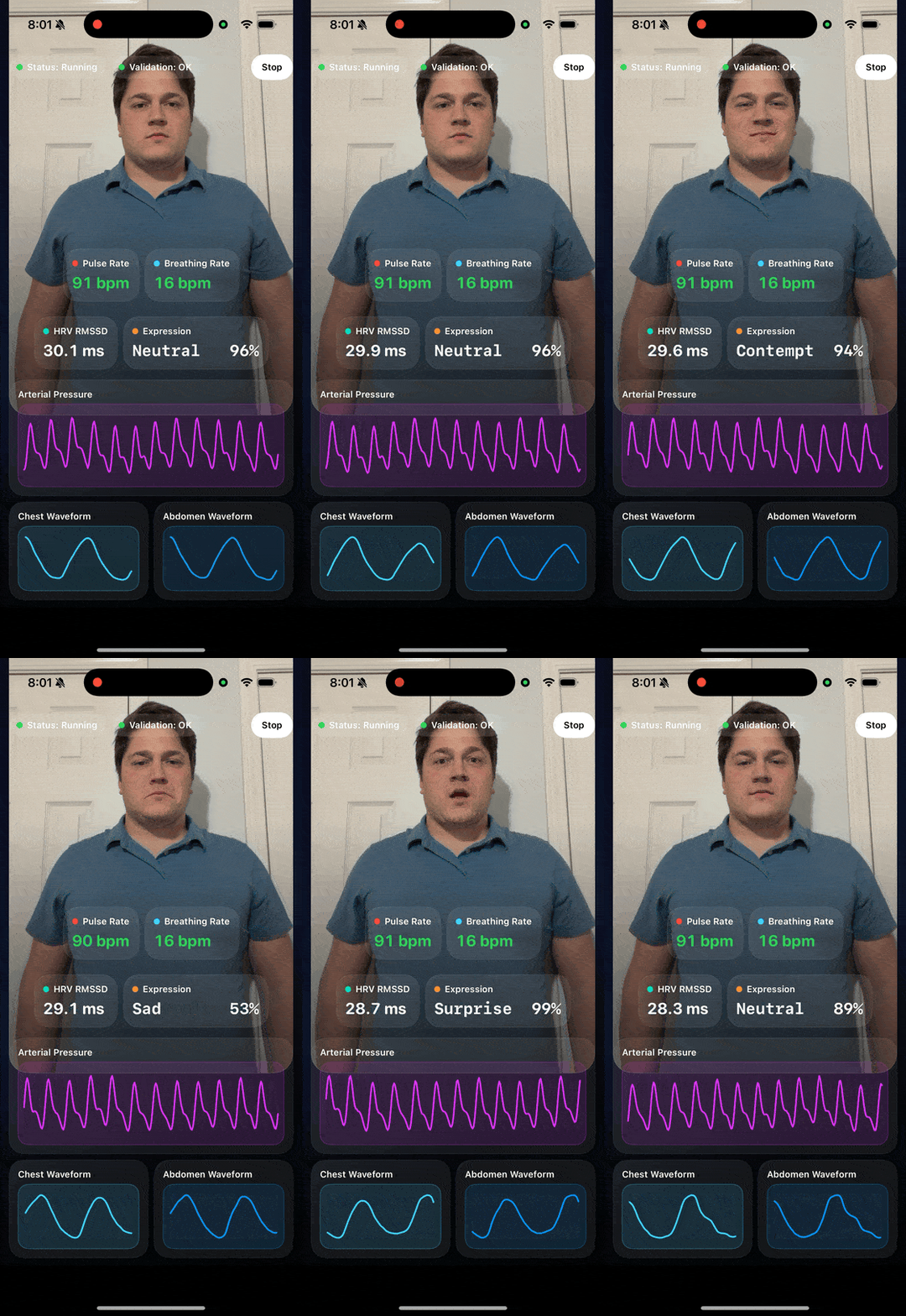
At the end, the app should show:
StatusandValidationat the top- live camera preview
- pulse rate, breathing rate, HRV RMSSD, and expression cards
- white labels for those four cards
- confidence-colored pulse and breath-rate values
- one large arterial pressure waveform
- chest and abdomen breathing waveforms
- guidance text below the breathing waveforms
- one portrait screen with no scrolling
In Xcode, create a new iOS app project:
- Select
File→New→Project... - Choose
iOS→App - Set
Product NametoCool Vitals - Set
InterfacetoSwiftUI - Set
LanguagetoSwift - Save the project
If you already created the project, open it instead.
In Finder, open:
Cool Vitals/Cool Vitals.xcodeproj
Then select the app target in Xcode.
In Xcode:
- Click
File→Add Package Dependencies... - Paste
https://github.com/Presage-Security/SmartSpectra-Swift/ - For repeatable builds, choose
Exact Versionand enter the latest released tag (3.3.0at time of writing) - Use
Branch→mainonly when testing the latest final public release before pinning a version - Add the package to the
Cool Vitalsapp target
Manual check:
- In the project navigator, you should now see
Package Dependencies SmartSpectrashould be attached to the app target
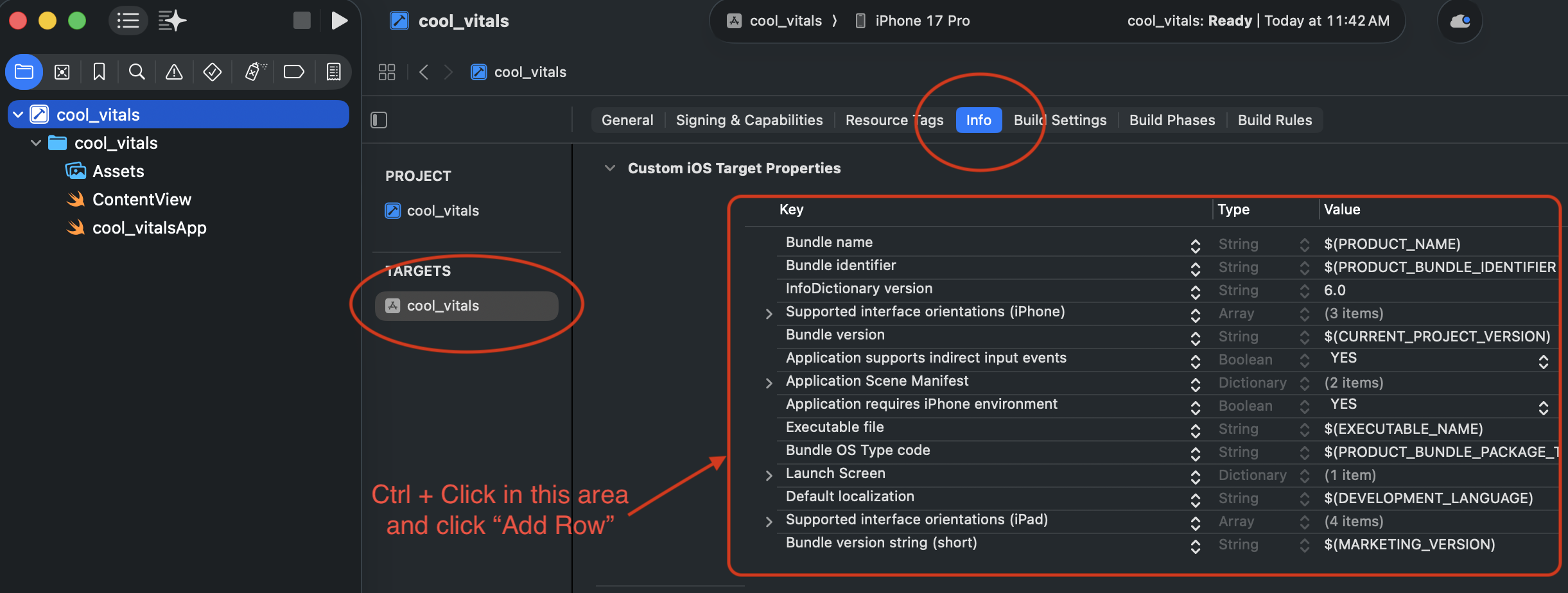
In Xcode:
- Select the
Cool Vitalstarget - Open the
Infotab - Add a new key named
Privacy - Camera Usage Description
NOTECtrl + Clickon theCustom iOS Target Propertiesand clickAdd Row - Set the value to
This app needs camera access to measure vitals.
This file does not come from Xcode.
This file is not created when you add the SmartSpectra package.
This file is not already inside your app project unless you or your team already downloaded it.
You need to get it from Presage first:
- Sign in to the Presage developer portal:
https://physiology.presagetech.com/auth/login - Register for OAuth in the Presage developer portal
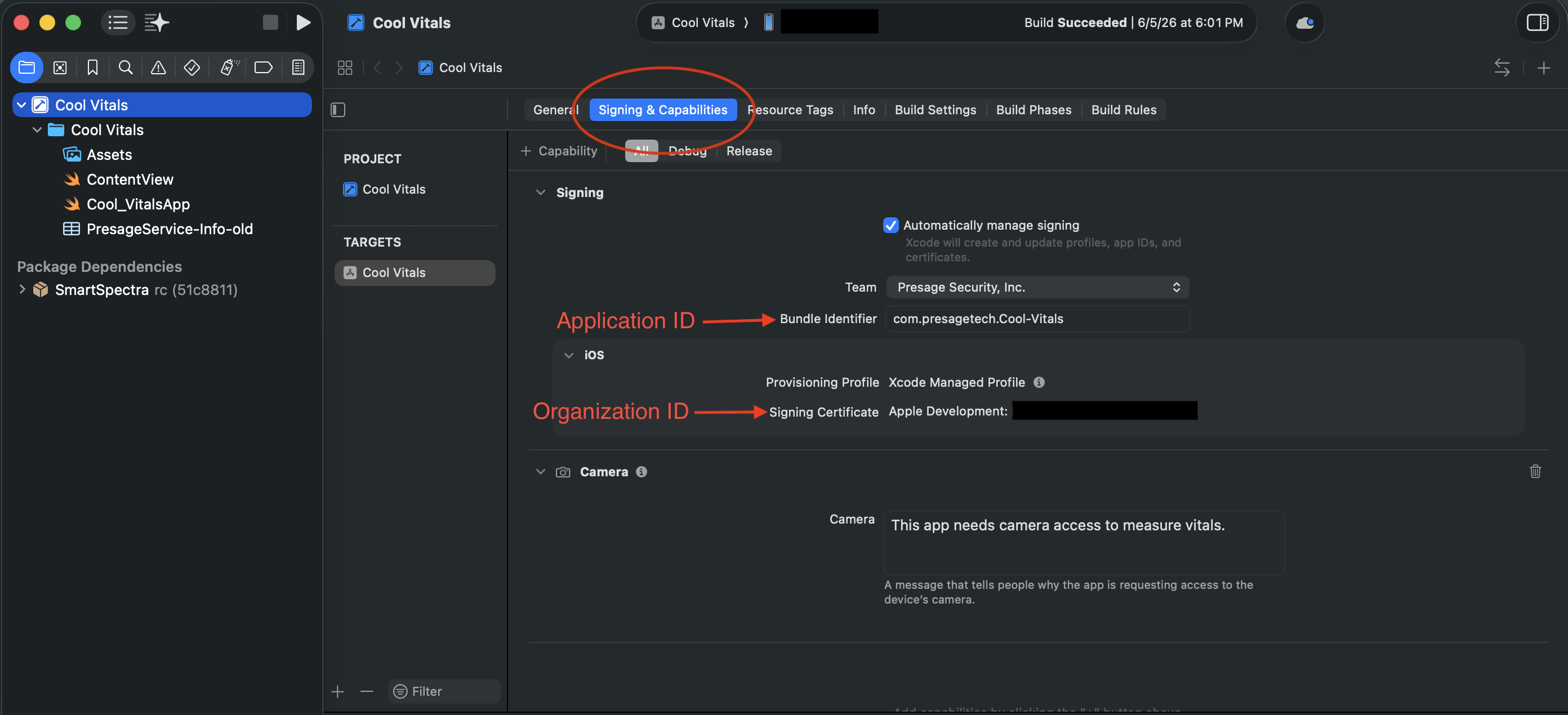
- Enter the app target's Bundle Identifier from
Signing & Capabilitiesin the Application ID field. It must match exactly, including capitalization. - Enter your Team ID in the Organization ID field. Find it in Xcode → Settings → Accounts, select your Apple ID and team, and read the
Team IDvalue — or in your Apple Developer Account underMembership Details. A Team ID is exactly 10 uppercase alphanumeric characters; it is not a certificate fingerprint. - Enable sandbox to additionally accept development App Attest identities from locally signed builds. Sandbox mode still accepts production identities from TestFlight and the App Store. When sandbox is disabled, only production identities are accepted.
- Enter the app target's Bundle Identifier from
- Download the iOS OAuth config file named
PresageService-Info.plist
Use this Signing & Capabilities view in Xcode to find the Application ID and Organization ID inputs mentioned above:
An AI assistant connected to the SmartSpectra MCP Server can do this step for you: it registers the bundle identifier and team ID (apps.register, including sandbox mode) and fetches PresageService-Info.plist (apps.get_config) without you opening the portal. Registration asks you to confirm before it takes effect.
If you cannot find a download for PresageService-Info.plist, stop here.
That means you do not have the OAuth config file yet. Ask Presage support or your Presage contact for the iOS OAuth plist for this app.
In Xcode:
- In Finder, locate the downloaded
PresageService-Info.plist - Drag that file from Finder into the Xcode project navigator
- When Xcode shows the add-file dialog:
- enable
Copy items if needed - make sure the
Cool Vitalstarget is checked
- enable
- Click
Finish
Then select the app target, open Signing & Capabilities, and add the App Attest capability. OAuth uses Apple's App Attest service, which requires a supported physical iOS or iPadOS device and a correctly provisioned app. Confirm DCAppAttestService.shared.isSupported is true on the device. The simulator cannot create an App Attest identity.
IS_OAUTH_ENABLED is the authentication-mode selector. Set it to true for OAuth; set it to false, omit the key (older plist revisions), or omit the plist entirely, to use sdk.config.apiKey. If OAuth is enabled and an API key is also supplied, OAuth takes precedence and the API key is ignored. Boolean values and legacy plist integer values 0 and 1 are accepted; strings such as "true" are rejected as a non-retryable configuration error — a present-but-invalid value never falls back to API-key authentication.
When OAuth is enabled, PresageService-Info.plist must contain non-blank string values for CLIENT_ID and SUB. BUNDLE_ID, when present, must exactly match the Bundle Identifier of the running app target (surrounding whitespace is ignored); a plist without BUNDLE_ID (older plist revisions) skips this local pre-check — the server still verifies the app's bundle identifier during authentication. SmartSpectra treats an invalid static field or mismatch as a non-retryable configuration error before contacting the authentication service.
In Xcode:
- Open
Cool Vitals/ContentView.swift - Delete everything in the file
- Paste the full file below
Paste this entire file:
import SwiftUI
import SmartSpectra
import AVFoundation
struct ContentView: View {
private enum TraceWindow {
static let rate = 120
static let arterialWaveform = 240
static let breathingWaveform = 180
}
private let sdk = SmartSpectraSDK.shared
@State private var didAutoStart = false
@State private var pulseRateBuffer: [MeasurementWithConfidence] = []
@State private var breathingRateBuffer: [MeasurementWithConfidence] = []
@State private var arterialPressureBuffer: [MeasurementWithConfidence] = []
@State private var chestBuffer: [SmartSpectra.Measurement] = []
@State private var abdomenBuffer: [SmartSpectra.Measurement] = []
@State private var latestHrv: Hrv?
@State private var latestExpressionScores: [ExpressionScore] = []
init() {
sdk.config.cameraPosition = .front
sdk.config.imageOutputEnabled = true
sdk.config.requestedMetrics =
SmartSpectraConfig.breathingMetrics +
SmartSpectraConfig.cardioMetrics + [
.expressions,
]
}
private enum WaveformProminence {
case primary
case secondary
}
private var metrics: Metrics? { sdk.metrics }
private var metricsUpdateToken: Int64 {
[
metrics?.cardio.pulseRate.last?.timestamp,
metrics?.breathing.rate.last?.timestamp,
metrics?.cardio.arterialPressureTrace.last?.timestamp,
metrics?.breathing.upperTrace.last?.timestamp,
metrics?.breathing.lowerTrace.last?.timestamp,
metrics?.cardio.hrv.last?.timestamp,
metrics?.face.expression.last?.timestamp,
]
.compactMap { $0 }
.max() ?? 0
}
private var pulseRateText: String {
formatMetric(pulseRateBuffer.last.map { Double($0.value) }, digits: 0, suffix: " bpm")
}
private var breathingRateText: String {
formatMetric(breathingRateBuffer.last.map { Double($0.value) }, digits: 0, suffix: " bpm")
}
private var hrvText: String {
guard let value = latestHrv?.rmssd, value > 0 else { return "--" }
return formatMetric(value, digits: 1, suffix: " ms")
}
private var latestExpressionScore: ExpressionScore? {
latestExpressionScores.max(by: { $0.confidence < $1.confidence })
}
private var latestExpressionLabel: String {
guard let score = latestExpressionScore else { return "--" }
let name = String(expressionName(score.type).prefix(8))
let paddedName = name + String(repeating: " ", count: max(0, 8 - name.count))
let percent = confidenceText(score.confidence)
let paddedPercent = String(repeating: " ", count: max(0, 4 - percent.count)) + percent
return "\(paddedName) \(paddedPercent)"
}
private var pulseConfidenceColor: Color {
confidenceColor(pulseRateBuffer.last?.confidence)
}
private var breathingConfidenceColor: Color {
confidenceColor(breathingRateBuffer.last?.confidence)
}
private var arterialPressureSamples: [Double] {
arterialPressureBuffer.map { Double($0.value) }
}
private var chestSamples: [Double] {
chestBuffer.map { Double($0.value) }
}
private var abdomenSamples: [Double] {
abdomenBuffer.map { Double($0.value) }
}
private var statusText: String {
switch sdk.processingStatus {
case .idle: return "Idle"
case .starting: return "Starting"
case .running: return "Running"
case .stopping: return "Stopping"
case .error: return "Error"
@unknown default: return "Unknown"
}
}
private var validationTitle: String {
guard let validationStatus = sdk.validationStatus else { return "Waiting" }
return validationStatus.hint
}
private var statusColor: Color {
switch sdk.processingStatus {
case .running: return .green
case .starting, .stopping: return .orange
case .error: return .red
case .idle: return .gray
@unknown default: return .gray
}
}
private var validationColor: Color {
guard let validationStatus = sdk.validationStatus else { return .gray }
switch validationStatus.code {
case .ok: return .green
case .cameraTuning: return .orange
default: return .yellow
}
}
var body: some View {
GeometryReader { geometry in
let compact = geometry.size.height < 820
let horizontalPadding: CGFloat = compact ? 12 : 16
let topSpacing: CGFloat = compact ? 8 : 12
let previewHeight = min(max(geometry.size.height * 0.26, 190), 250)
VStack(spacing: topSpacing) {
statusBar(compact: compact)
.zIndex(1)
previewCard
.frame(height: previewHeight)
.zIndex(0)
HStack(spacing: topSpacing) {
metricCard(
title: "Pulse Rate",
value: pulseRateText,
valueColor: pulseConfidenceColor,
accent: .red,
compact: compact
)
metricCard(
title: "Breathing Rate",
value: breathingRateText,
valueColor: breathingConfidenceColor,
accent: .cyan,
compact: compact
)
}
.frame(maxHeight: compact ? 82 : 92)
HStack(spacing: topSpacing) {
metricCard(
title: "HRV RMSSD",
value: hrvText,
valueColor: .white,
accent: .mint,
compact: compact
)
metricCard(
title: "Expression",
value: latestExpressionLabel,
valueColor: .white,
accent: .orange,
compact: compact,
monospacedValue: true
)
}
.frame(maxHeight: compact ? 82 : 92)
waveformCard(
title: "Arterial Pressure",
samples: arterialPressureSamples,
accent: .purple,
compact: compact,
prominence: .primary
)
.frame(height: compact ? 154 : 182)
HStack(spacing: topSpacing) {
waveformCard(
title: "Chest Waveform",
samples: chestSamples,
accent: .cyan,
compact: compact,
prominence: .secondary
)
waveformCard(
title: "Abdomen Waveform",
samples: abdomenSamples,
accent: .blue,
compact: compact,
prominence: .secondary
)
}
.frame(height: compact ? 130 : 146)
guidanceText
}
.padding(.horizontal, horizontalPadding)
.padding(.vertical, compact ? 10 : 14)
.background(backgroundGradient.ignoresSafeArea())
}
.task {
await startIfNeeded()
}
.task(id: metricsUpdateToken) {
mergeCurrentMetrics()
}
}
// The SDK's `hint` is written for end users — surface it as-is.
private var guidanceText: some View {
Text(sdk.validationStatus?.hint ?? "Getting ready\u{2026}")
.font(.footnote)
.foregroundStyle(.white.opacity(0.85))
.multilineTextAlignment(.center)
.frame(maxWidth: .infinity)
.accessibilityLabel("Measurement guidance")
}
private var previewCard: some View {
ZStack {
if let image = sdk.imageOutput {
Image(uiImage: image)
.resizable()
.aspectRatio(contentMode: .fill)
.frame(maxWidth: .infinity, maxHeight: .infinity)
.clipped()
} else {
LinearGradient(
colors: [Color(red: 0.16, green: 0.24, blue: 0.46), Color.black],
startPoint: .topLeading,
endPoint: .bottomTrailing
)
VStack(spacing: 10) {
Image(systemName: "camera.viewfinder")
.font(.system(size: 40, weight: .semibold))
Text("Camera preview will appear here")
.font(.headline)
}
.foregroundStyle(.white.opacity(0.92))
}
LinearGradient(
colors: [.black.opacity(0.68), .black.opacity(0.12), .clear],
startPoint: .bottom,
endPoint: .top
)
}
.frame(maxWidth: .infinity, maxHeight: .infinity)
.clipShape(RoundedRectangle(cornerRadius: 26, style: .continuous))
.overlay(
RoundedRectangle(cornerRadius: 26, style: .continuous)
.stroke(.white.opacity(0.12), lineWidth: 1)
)
.shadow(color: .black.opacity(0.35), radius: 18, x: 0, y: 10)
}
private func statusBar(compact: Bool) -> some View {
HStack(spacing: compact ? 8 : 10) {
badge(title: "Status", value: statusText, color: statusColor)
badge(title: "Validation", value: validationTitle, color: validationColor)
Spacer(minLength: 8)
Button(action: toggleMeasurement) {
Text(sdk.processingStatus == .running ? "Stop" : "Start")
.font(.caption.bold())
.padding(.horizontal, compact ? 14 : 18)
.padding(.vertical, 10)
.background(.white, in: Capsule())
.foregroundStyle(.black)
}
}
}
private func metricCard(
title: String,
value: String,
valueColor: Color,
accent: Color,
compact: Bool,
monospacedValue: Bool = false
) -> some View {
VStack(alignment: .leading, spacing: compact ? 6 : 8) {
HStack(spacing: 6) {
Circle()
.fill(accent)
.frame(width: 8, height: 8)
Text(title)
.font(.caption.weight(.semibold))
.foregroundStyle(.white)
}
Text(value)
.font(.system(size: compact ? 21 : 24, weight: .bold, design: monospacedValue ? .monospaced : .rounded))
.foregroundStyle(valueColor)
.monospacedDigit()
.lineLimit(1)
.minimumScaleFactor(0.7)
}
.dashboardCard()
}
private func waveformCard(
title: String,
samples: [Double],
accent: Color,
compact: Bool,
prominence: WaveformProminence
) -> some View {
VStack(alignment: .leading, spacing: compact ? 6 : 8) {
VStack(alignment: .leading, spacing: 2) {
Text(title)
.font(.caption.weight(.semibold))
.foregroundStyle(.white)
}
ZStack {
RoundedRectangle(cornerRadius: 14, style: .continuous)
.fill(accent.opacity(0.12))
if samples.count > 1 {
WaveformView(
samples: samples,
strokeColor: accent,
verticalPaddingFraction: prominence == .primary ? 0.14 : 0.08
)
.padding(prominence == .primary ? 8 : 10)
}
}
.frame(maxHeight: .infinity)
.overlay(
RoundedRectangle(cornerRadius: 14, style: .continuous)
.stroke(accent.opacity(0.3), lineWidth: 1)
)
}
.dashboardCard()
}
private func badge(title: String, value: String, color: Color) -> some View {
HStack(spacing: 6) {
Circle()
.fill(color)
.frame(width: 8, height: 8)
Text("\(title): \(value)")
.font(.caption.weight(.semibold))
}
.padding(.horizontal, 10)
.padding(.vertical, 8)
.background(.white.opacity(0.12), in: Capsule())
.foregroundStyle(.white)
}
private func mergeCurrentMetrics() {
guard let metrics else { return }
if !metrics.cardio.pulseRate.isEmpty {
pulseRateBuffer.appendProtoArray(contentsOf: metrics.cardio.pulseRate)
pulseRateBuffer = Array(pulseRateBuffer.suffix(TraceWindow.rate))
}
if !metrics.breathing.rate.isEmpty {
breathingRateBuffer.appendProtoArray(contentsOf: metrics.breathing.rate)
breathingRateBuffer = Array(breathingRateBuffer.suffix(TraceWindow.rate))
}
if !metrics.cardio.arterialPressureTrace.isEmpty {
arterialPressureBuffer.appendProtoArray(contentsOf: metrics.cardio.arterialPressureTrace)
arterialPressureBuffer = Array(arterialPressureBuffer.suffix(TraceWindow.arterialWaveform))
}
if !metrics.breathing.upperTrace.isEmpty {
chestBuffer.appendProtoArray(contentsOf: metrics.breathing.upperTrace)
chestBuffer = Array(chestBuffer.suffix(TraceWindow.breathingWaveform))
}
if !metrics.breathing.lowerTrace.isEmpty {
abdomenBuffer.appendProtoArray(contentsOf: metrics.breathing.lowerTrace)
abdomenBuffer = Array(abdomenBuffer.suffix(TraceWindow.breathingWaveform))
}
if let hrv = metrics.cardio.hrv.last {
latestHrv = hrv
}
if let scores = metrics.face.expression.last?.scores, !scores.isEmpty {
latestExpressionScores = scores
}
}
private func resetBuffers() {
pulseRateBuffer.removeAll(keepingCapacity: true)
breathingRateBuffer.removeAll(keepingCapacity: true)
arterialPressureBuffer.removeAll(keepingCapacity: true)
chestBuffer.removeAll(keepingCapacity: true)
abdomenBuffer.removeAll(keepingCapacity: true)
latestHrv = nil
latestExpressionScores.removeAll(keepingCapacity: true)
}
private func toggleMeasurement() {
Task {
if sdk.processingStatus == .running || sdk.processingStatus == .starting {
try? await sdk.stop()
} else {
resetBuffers()
try? await sdk.start()
}
}
}
private func startIfNeeded() async {
guard !didAutoStart else { return }
didAutoStart = true
guard sdk.processingStatus == .idle else { return }
resetBuffers()
try? await sdk.start()
}
private func confidenceText(_ confidence: Float?) -> String {
guard let confidence, confidence.isFinite else { return "--" }
let percent = min(max(Double(confidence), 0), 100)
return "\(Int(percent.rounded()))%"
}
private func confidenceColor(_ confidence: Float?) -> Color {
guard let confidence, confidence.isFinite else { return .white.opacity(0.65) }
let percent = min(max(Double(confidence), 0), 100)
switch percent {
case 85...:
return .green
case 60..<85:
return .yellow
default:
return .red
}
}
private func formatMetric(_ value: Double?, digits: Int = 0, suffix: String = "") -> String {
guard let value else { return "--" }
if digits == 0 {
return "\(Int(value.rounded()))\(suffix)"
}
return String(format: "% .\(digits)f", value).replacingOccurrences(of: " ", with: "") + suffix
}
private func expressionName(_ type: ExpressionType) -> String {
switch type {
case .unspecified: return "Unspecified"
case .angry: return "Angry"
case .contempt: return "Contempt"
case .disgust: return "Disgust"
case .fear: return "Fear"
case .happy: return "Happy"
case .neutral: return "Neutral"
case .sad: return "Sad"
case .surprise: return "Surprise"
case .UNRECOGNIZED(_): return "Unknown"
@unknown default: return "Unknown"
}
}
private var backgroundGradient: LinearGradient {
LinearGradient(
colors: [
Color(red: 0.03, green: 0.05, blue: 0.12),
Color(red: 0.07, green: 0.09, blue: 0.18),
Color.black,
],
startPoint: .topLeading,
endPoint: .bottomTrailing
)
}
}
private struct WaveformView: View {
let samples: [Double]
let strokeColor: Color
let verticalPaddingFraction: Double
var body: some View {
GeometryReader { geometry in
Path { path in
guard samples.count > 1 else { return }
let minValue = samples.min() ?? 0
let maxValue = samples.max() ?? 1
let rawRange = max(maxValue - minValue, 0.0001)
let padding = rawRange * verticalPaddingFraction
let lowerBound = minValue - padding
let upperBound = maxValue + padding
let range = max(upperBound - lowerBound, 0.0001)
for (index, sample) in samples.enumerated() {
let x = geometry.size.width * CGFloat(index) / CGFloat(samples.count - 1)
let normalized = (sample - lowerBound) / range
let y = geometry.size.height * (1 - normalized)
if index == 0 {
path.move(to: CGPoint(x: x, y: y))
} else {
path.addLine(to: CGPoint(x: x, y: y))
}
}
}
.stroke(strokeColor, style: StrokeStyle(lineWidth: 2.2, lineCap: .round, lineJoin: .round))
}
}
}
private extension View {
func dashboardCard() -> some View {
self
.padding(12)
.background(
RoundedRectangle(cornerRadius: 20, style: .continuous)
.fill(Color.white.opacity(0.08))
)
.overlay(
RoundedRectangle(cornerRadius: 20, style: .continuous)
.stroke(Color.white.opacity(0.08), lineWidth: 1)
)
}
}In Xcode:
- Choose a supported physical iOS or iPadOS device as the run destination
- Confirm the app target has the App Attest capability
- Build and run the app
- Allow camera access when iOS asks
- Wait a few seconds for camera tuning and signal stabilization
Run this on a physical device — the simulator has no camera. (For automated tests, where frames come from a video file instead, the simulator is supported; see Headless testing in CI.)
When your program is running, you should see all of these:
StatusandValidationchips are visible at the top- the preview is below the chips
- the arterial pressure waveform is larger than the breathing waveforms
- chest and abdomen waveforms both appear on screen
- the guidance text is below those waveforms
- the pulse and breath-rate numbers change color with confidence
- expressions and HRV are reported
If OAuth is wired correctly, you should not see this fallback log at launch:
PresageService-Info.plist not found. OAuth authentication will be disabled. Using API key authentication instead.
If you do see it, the plist is missing from the target or was not copied into the app.
If the screen does not match the target state, check these first:
- the package was added to the wrong target
ContentView.swiftwas only partially replacedPresageService-Info.plistis not in target membership- the app is still running an older installed build on the phone
- the app was run in the simulator instead of on a supported physical iOS or iPadOS device
Option 1: API Key
The fastest SmartSpectra Swift setup: add the package, drop in an API key, and run a first pulse and breathing measurement on device.
Configuring Metrics
Request pulse, breathing, HRV and EDA metric groups from the SmartSpectra Swift SDK, and read the samples its observable state publishes.